Overview
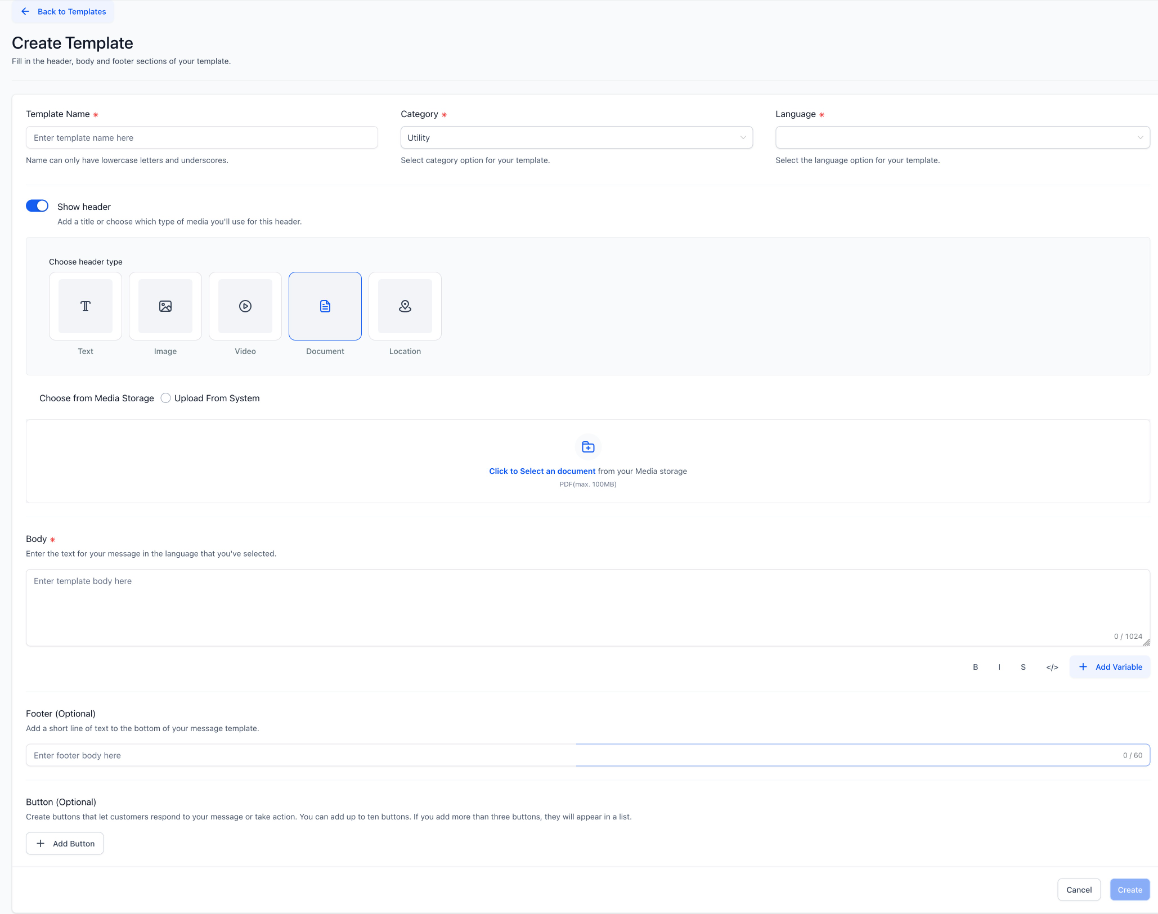
We’ve enhanced WhatsApp Template creation and updates by integrating the Platform Media Library directly into the header media selection flow.
Businesses can now reuse existing media assets or upload new ones—including audio files—without leaving the template builder. This reduces friction, improves consistency, and accelerates campaign setup.
How It Works
When creating or editing a WhatsApp template with a media header:
Select the header type (Image, Video, Document, or Audio).
Choose how to add media:
Upload from your computer, or
Choose from the Media Library.
The Media Library opens within the builder and automatically filters assets based on the selected header type.
Select the asset and continue building your template—no downloading or re-uploading required.
This experience is available for both new templates and existing template updates.
How This Helps Businesses
- Faster Template & Campaign Launches
Businesses often reuse the same assets—brand visuals, PDFs, videos, or audio clips—across multiple templates.
Eliminates repetitive downloads and uploads
Speeds up template creation and approvals
Helps teams launch campaigns faster
- Better Brand & Message Consistency
Using a centralized Media Library ensures:
Only approved, up-to-date assets are reused
Consistent visuals, documents, and audio across templates
Reduced risk of sending outdated or incorrect files to customers
- Support for Richer Customer Experiences
With audio (MP3) support:
Businesses can share voice notes, announcements, or audio explanations
Enables more personalized and engaging communication
Expands use cases beyond static images and documents
- Improved Team Collaboration
For accounts and multi-team businesses:
Media is uploaded once and reused across templates
Teams work from a single source of truth
Fewer internal handoffs to locate the “right” file
- Fewer Errors, Less Rework
The integrated Media Library:
Filters assets by supported media type automatically
Encourages reuse of previously validated files
Reduces failed submissions and back-and-forth corrections
- A More Intuitive, Polished Experience
The upload flow now aligns with the Platform's design system:
Clear choices reduce confusion
Fewer steps lower cognitive load
A smoother experience builds confidence for new and advanced users alike
Supported File Types for Template Headers
- Images: JPG, PNG
- Videos: MP4
- Documents: PDF
- Audio: MP3
Was this article helpful?
That’s Great!
Thank you for your feedback
Sorry! We couldn't be helpful
Thank you for your feedback
Feedback sent
We appreciate your effort and will try to fix the article